Python程序员如何学习C++
动机,思路,资源
学习C++语言的动机:
工具角度:
- 硬件亲和性高,更细粒度的控制硬件(CUDF)
- 零开销抽象,性能标杆,给脚本语言提供高性能的core(pytorch;opencv;tvm...)
- 更细粒度地与操作系统交互,很好地控制系统调用,如使用perf工具写性能分析工具,使用ptrace写debugger(pdb)
- Native语言,不依赖VM,更小的启动开销
- 强大的类型系统与现代特性,抽象能力与表达能力的标杆(但协作开发更难就是了。。)
- 数一数二的生态。科学计算领域/AI/仿真/数据库/编译器/渲染引擎,几乎没有啥它不能开发的
工具角度其实是非常重要的,至少在我看来,我学习CS相关的很多知识,都是为了让我能把工具好好地用起来,正所谓“君子生非异也,善假于物也”,小到提升个人竞争力,大到工匠精神或者体验强大工具带来的便利感与可能性。对我来说,这些是我的原始动力
扩充视野角度:
- 逼你学习内存管理,对效率/开销的考量粒度更细;
- 使你更进一步地认识自己已知的语言,如函数语义
- 逼你学习主流操作系统下,可执行文件/静态库/动态库,编译链接等知识,清扫软件学习的障碍
- 扩充对软件的认识,GUI/OS/DBMS(LevelDB,MongoDB,Qt...),窥探底层,带来一双透视眼
- code generation/模板元编程等骚操作。。
当然,也要反过来想想,自己已知的高级语言相比于CPP的优势
我的思路
大体流程上:
- 了解,通过一些talk,如cppcons,大佬的指引了解这门语言,有个overview,并且有个大概方向;
- 入门,主要是看书和折腾,在读书,捣鼓工具链,抄代码三个过程中反复横跳
- 入门-看书:这时候主要是参考百科全书类读物,顺着读带有实践内容的好的书
- 捣鼓工具链:不仅是搞IDE,要了解全流程以及相关的工具链,编译器,链接器,调试器,甚至是repl,了解它们将为你扫清很多障碍(当然不能特别特别深入,一般判断准则是你与好友交流,你能把整个流程讲清楚,每个工具的大致作用描述出来,就不错了),
- 抄代码:会抄代码你才会写代码,一边抄一边思考(咋思考这个估计教不了了。。),项目选择的准则是:
- 虽小,五脏俱全
- 和学习动机强相关
入门阶段,应该是比较久的,毕竟CPP出了名的复杂,记得不管哪个过程都要一直动手,dirty your hands。如何控制这三个过程的投入比例?要记住现在的主要目的是为后面的实践铺路,所以关键是你得掌握基础知识,所以看书并跑通代码绝对是你的主战场。
- 开发,并继续学习。在看书且抄代码,写算法题,回顾三个过程中反复横跳
学习资源
- 了解
- 博客:
- talks/videos:
- 入门
- 书籍:
- Accelerated CPP
- c++ primer
- 微软现代CPP编程指南
- learncpp.com
- 工具链:
- CMake
- GDB
- 语言基础
- 入门项目
- MingDebugger
- minigdb
- CoCoVM
- ELL
- windows_ai
- NumCpp
- Dlib
- 书籍:
- 领域相关项目
- 机器学习
- MetaNN
语言基础
(环境篇)MSVC使用指南
x86-hosted VS x64-hosted
https://www.cnblogs.com/flyinggod/p/10838214.html
环境变量设置
tools,include files,library files,SDKs
具体使用到的环境变量为
PATH,TMP,INCLUDE,LIB,LIBTH
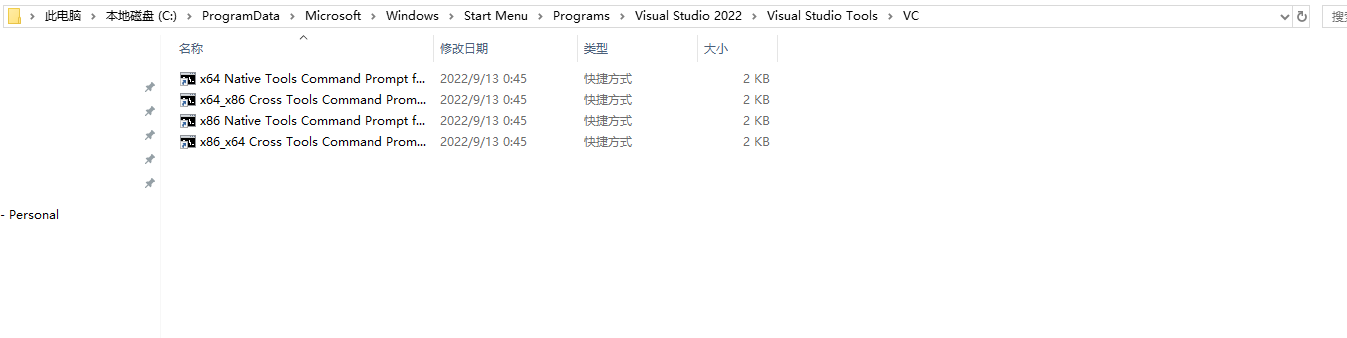
- 前提:一个巨坑,系统变量——VSINSTALLDIR(https://developercommunity.visualstudio.com/t/vcvars32bat-fails-after-upgrade-to-vs-2017-version/375841)
- 记住配置自己的命令行脚本,比如init.bat
命令行指南
- 如果只想要编译器,链接器,标准库,以及其他C++开发的基础工具,则使用installer安装时只需要勾选:
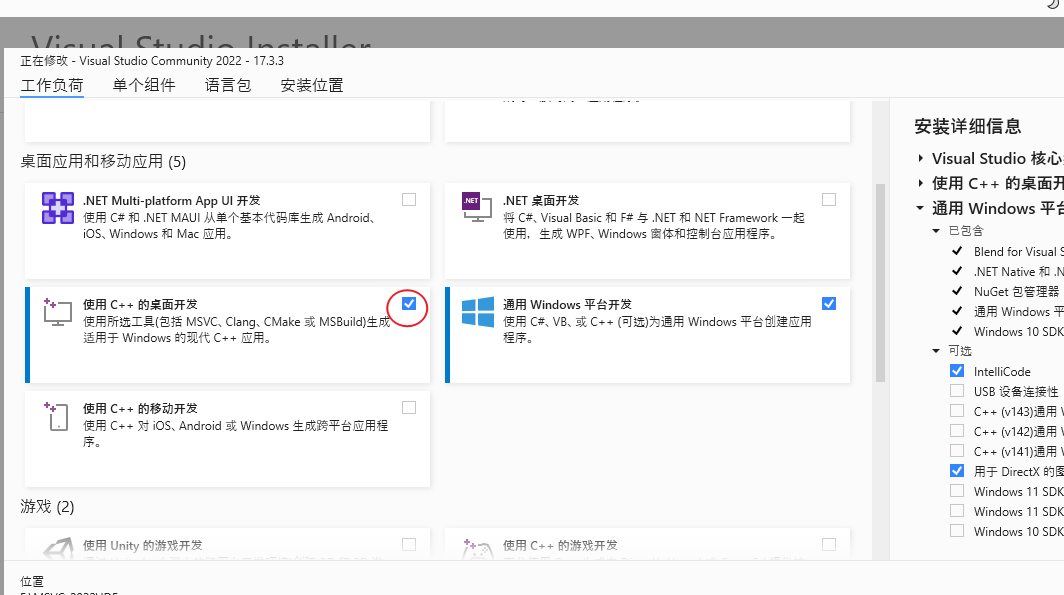
- 类似gcc xxx.cpp,直接生成可执行文件
cl /EHsc xxx.cpp可能是我还没习惯,但windows下的环境搭建,,真的好难
工具集:
- CL
- Link
项目管理工具
- MSBUILD
- CMake
集成CUDA
CUDA所包含的:
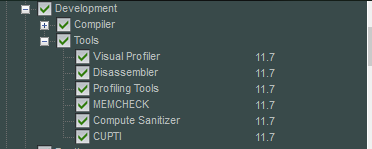
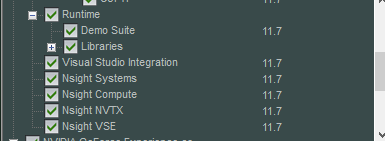
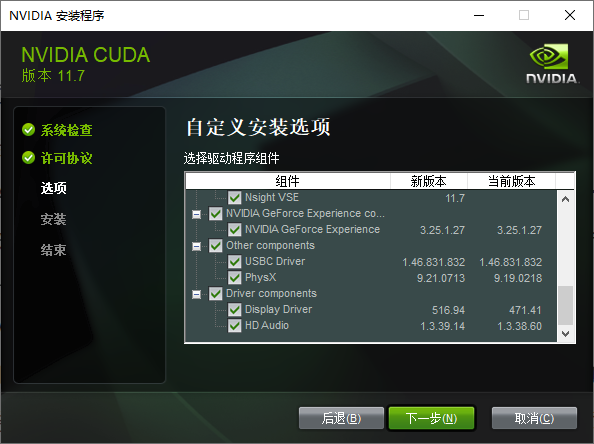
推荐使用CMake来构建项目,因为:
- 相对来说,跨平台能力最强
使用CMake来构建项目,常见问题:
- cmake No CUDA toolset found
- 注意CMake版本:保证CMake v3.21 or higher
- 注意两个环境变量,下面是示例:
- CMAKE_CUDA_COMPILER = C:\Program Files\NVIDIA GPU Computing Toolkit\CUDA\v11.6\bin\nvcc.exe
- CUDA_PATH = C:\Program Files\NVIDIA GPU Computing Toolkit\CUDA\v11.6
- CUDA_PATH_V11_6 = C:\Program Files\NVIDIA GPU Computing Toolkit\CUDA\v11.6
- CUDA集成问题:copied the files in C:\Program Files\NVIDIA GPU Computing Toolkit\CUDA\v11.6\extras\visual_studio_integration\MSBuildExtensions to here C:\Program Files (x86)\Microsoft Visual Studio\2019\Community\MSBuild\Microsoft\VC\v160\BuildCustomizations,具体见stackoverflow
- set(CMAKE_CUDA_COMPILER "D:/nvidia/bin/nvcc.exe")
- CUDA_ARCHITECTURES NOT FOUND
- set(CMAKE_CUDA_ARCHITECTURES {你的兼容性版本})
- MS版本过新:unsupported Microsoft Visual Studio version!
- 这个我帮你试过了(走了亿些弯路),总而言之,在windows下,你只能重装/再安装一个适配的CUDA版本
在windows下编译成功的这种快乐,你也值得拥有
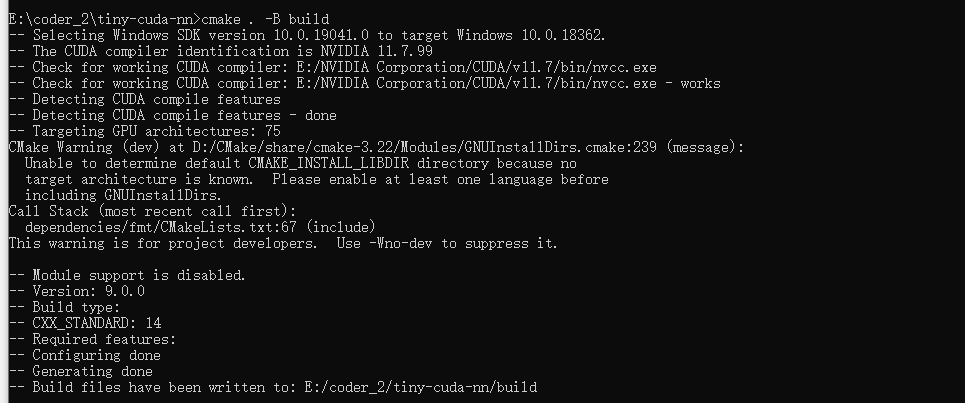

构建Neoml
E:\coder_2\neoml>E:\MSVC_2022\IDE\VC\Auxiliary\Build\vcvarsall.bat amd64
**********************************************************************
** Visual Studio 2022 Developer Command Prompt v17.3.3
** Copyright (c) 2022 Microsoft Corporation
**********************************************************************
[vcvarsall.bat] Environment initialized for: 'x64'

E:\coder_2\neoml>cmake -G "Visual Studio 17 2022" -A x64 .\NeoML -DCMAKE_INSTALL_PREFIX=.
-- Selecting Windows SDK version 10.0.19041.0 to target Windows 10.0.18362.
-- The CXX compiler identification is MSVC 19.33.31629.0
-- Detecting CXX compiler ABI info
-- Detecting CXX compiler ABI info - done
-- Check for working CXX compiler: E:/MSVC_2022/IDE/VC/Tools/MSVC/14.33.31629/bin/Hostx64/x64/cl.exe - skipped
-- Detecting CXX compile features
-- Detecting CXX compile features - done
-- The C compiler identification is MSVC 19.33.31629.0
-- Detecting C compiler ABI info
-- Detecting C compiler ABI info - done
-- Check for working C compiler: E:/MSVC_2022/IDE/VC/Tools/MSVC/14.33.31629/bin/Hostx64/x64/cl.exe - skipped
-- Detecting C compile features
-- Detecting C compile features - done
-- Found OpenMP_C: -openmp (found version "2.0")
-- Found OpenMP_CXX: -openmp (found version "2.0")
-- Found OpenMP: TRUE (found version "2.0")
-- Looking for a CUDA compiler
-- Looking for a CUDA compiler - E:/NVIDIA Corporation/CUDA/v11.7/bin/nvcc.exe
-- The CUDA compiler identification is NVIDIA 11.7.99
-- Detecting CUDA compiler ABI info
-- Detecting CUDA compiler ABI info - done
-- Check for working CUDA compiler: E:/NVIDIA Corporation/CUDA/v11.7/bin/nvcc.exe - skipped
-- Detecting CUDA compile features
-- Detecting CUDA compile features - done
-- Found Vulkan: FALSE
-- Found OpenMP: TRUE (found version "2.0")
-- Could NOT find MKL (missing: MKL_INCLUDE_DIR MKL_CORE_LIB MKL_SEQUENTIAL_LIB MKL_INTEL_LIB)
--
-- 3.11.4.0
-- Looking for pthread.h
-- Looking for pthread.h - not found
-- Found Threads: TRUE
CMake Deprecation Warning at E:/coder_2/neoml/_deps/googletest-src/CMakeLists.txt:4 (cmake_minimum_required):
  Compatibility with CMake < 2.8.12 will be removed from a future version of
  CMake.

  Update the VERSION argument <min> value or use a ...<max> suffix to tell
  CMake that the project does not need compatibility with older versions.


CMake Deprecation Warning at E:/coder_2/neoml/_deps/googletest-src/googletest/CMakeLists.txt:56 (cmake_minimum_required):
  Compatibility with CMake < 2.8.12 will be removed from a future version of
  CMake.

  Update the VERSION argument <min> value or use a ...<max> suffix to tell
  CMake that the project does not need compatibility with older versions.


-- Found PythonInterp: D:/Anaconda3/python.exe (found version "3.8.3")
-- Configuring done
CMake Warning (dev) in E:/coder_2/neoml/NeoMathEngine/src/CMakeLists.txt:
  Policy CMP0104 is not set: CMAKE_CUDA_ARCHITECTURES now detected for NVCC,
  empty CUDA_ARCHITECTURES not allowed.  Run "cmake --help-policy CMP0104"
  for policy details.  Use the cmake_policy command to set the policy and
  suppress this warning.

  CUDA_ARCHITECTURES is empty for target "NeoMathEngine".
This warning is for project developers.  Use -Wno-dev to suppress it.

CMake Warning (dev) in E:/coder_2/neoml/NeoMathEngine/src/CMakeLists.txt:
  Policy CMP0104 is not set: CMAKE_CUDA_ARCHITECTURES now detected for NVCC,
  empty CUDA_ARCHITECTURES not allowed.  Run "cmake --help-policy CMP0104"
  for policy details.  Use the cmake_policy command to set the policy and
  suppress this warning.

  CUDA_ARCHITECTURES is empty for target "NeoMathEngine".
This warning is for project developers.  Use -Wno-dev to suppress it.

CMake Warning (dev) in E:/coder_2/neoml/NeoMathEngine/src/CMakeLists.txt:
  Policy CMP0104 is not set: CMAKE_CUDA_ARCHITECTURES now detected for NVCC,
  empty CUDA_ARCHITECTURES not allowed.  Run "cmake --help-policy CMP0104"
  for policy details.  Use the cmake_policy command to set the policy and
  suppress this warning.

  CUDA_ARCHITECTURES is empty for target "NeoMathEngine".
This warning is for project developers.  Use -Wno-dev to suppress it.

CMake Warning (dev) in E:/coder_2/neoml/NeoMathEngine/src/CMakeLists.txt:
  Policy CMP0104 is not set: CMAKE_CUDA_ARCHITECTURES now detected for NVCC,
  empty CUDA_ARCHITECTURES not allowed.  Run "cmake --help-policy CMP0104"
  for policy details.  Use the cmake_policy command to set the policy and
  suppress this warning.

  CUDA_ARCHITECTURES is empty for target "NeoMathEngine".
This warning is for project developers.  Use -Wno-dev to suppress it.

-- Generating done
-- Build files have been written to: E:/coder_2/neoml
学习MSVC项目的build system
本文以一个工业级项目NeoML来讲解如何形成自己的Windows下的MSVC-CMAKE workflow。
visual studio版本-2022,CUDA-11.7(这两个是最新的发布版本,用它们其实我有点虚。。,但很多DL相关的项目都是在较高的版本上测试过的,so..)
首先要对一些文件类型有个大致的概念:其中黑体字的会重点介绍
| 文件名 | 目录位置 | 解决方案资源管理器位置 | 说明 |
|---|---|---|---|
| Solname.sln | Projname | 在解决方案资源管理器中不显示 | 解决方案文件。 它将一个或多个项目的所有元素组织到一个解决方案中。 |
| Projname.suo | Projname | 在解决方案资源管理器中不显示 | 解决方案选项文件。 它存储解决方案的自定义项,以便每次打开解决方案中的项目或文件时,都具有所需的外观和行为。 |
| Projname.vcxproj | Projname | 在解决方案资源管理器中不显示 | 项目文件。 它存储特定于每个项目的信息。 (在早期版本中,此文件被命名为 Projname.vcproj 或 Projname.dsp。)有关 C++ 项目文件 (.vcxproj) 的示例,请参阅项目文件。 |
| Projname.sdf | Projname | 在解决方案资源管理器中不显示 | 浏览数据库文件。 它支持浏览和导航功能,如“转到定义”、“查找所有引用”和“类视图”。 它是通过分析头文件生成的。 |
| Projname.vcxproj.filters | Projname | 在解决方案资源管理器中不显示 | 筛选器文件。 它指定在何处放置添加到解决方案的文件。 例如,.h 文件置于“头文件”节点中。 |
| Projname.vcxproj.user | Projname | 在解决方案资源管理器中不显示 | 迁移用户文件。 从 Visual Studio 2008 迁移项目之后,此文件包含从任何 .vsprops 文件转换的信息。 |
| Projname.idl | Projname | 源 | (特定于项目)包含控件类型库的接口描述语言 (IDL) 源代码。 此文件由 Visual C++ 用于生成类型库。 生成的库会向其他自动化客户端公开控件的接口。 有关详细信息,请参阅 Windows SDK 中的接口定义 (IDL) 文件。 |
| Readme.txt | Projname | Project | 自述文件。 它由应用程序向导生成,描述项目中的文件。 |
MSBUILD是WINDOWS下默认的项目系统,当你新建一个windows项目,项目的属性(可以理解为对项目信息的一种描述)被存储在一种扩展名为vcxproj的XML文件下。MS推荐使用者在IDE中创建以及修改vcxproj文件,避免手动修改带来的问题。
如果要修改编译相关的属性,去这里https://learn.microsoft.com/zh-cn/cpp/build/working-with-project-properties?view=msvc-170
在vcxproj文件中,要注意两种重要内容:Build.props和Build.targets
编译器选项以及编译属性
VS调试pybind应用
调试其他库代码work-flow
NeoML的FineObjLite
调试NeoML.dll
tiny-cuda-nn
(基础篇)如何利用learn-cpp和MS的modern cpp tutors
类型与数据
- 隐式转换
// 字面量的隐式转换:略
// 变量的隐式转换
#include <iostream>

void print(double x) // print takes an double parameter
{
	std::cout << x;
}

int main()
{
	int y { 5 };
	print(y); // y is of type int

	return 0;
}

// unsafe conversions:如信息丢失
int main()
{
    double d { 5 }; // okay: int to double is safe
    int x { 5.5 }; // error: double to int not safe

    return 0;
}
每次类型转换,都产生了新的值
隐式类型转换是个丰富的课题
显式类型转换static_cast
#include <iostream>

void print(int x)
{
	std::cout << x;
}

int main()
{
	print( static_cast<int>(5.5) ); // explicitly convert double value 5.5 to an int

	return 0;
}
memory view
- 内存位置
#include<iostream>
using namespace std;

int main(){
    int array[5], i;
    cout << "Size of integer in this compiler is "
        << sizeof(int) << "\n";

    for (i=0; i < 5; i++){
        cout << "Address array[" << i << "] is " << &array[i] << "\n";
    }
    return 0;
}
动态内存分配
CPP支持三种类型的动态内存分配:
- 静态内存分配:给静态变量以及全局变量分配内存。
Templates
Templates enable you to define the operations of a class or function, and let the user specify what concrete types those operations should work on.
// 之前有使用过julia进行编程,会觉得这块很容易理解
template <typename T>
T minimum(const T& lhs, const T& rhs)
{
    return lhs < rhs ? lhs : rhs;
}
The primary restriction when using templates is that a type argument must support any operations that are applied to the type parameters.
开发重点
benchmark/algorithms
- cppitertools
- cuda-exe
memory manager
高效数据结构/存储形式/data manipulation
参考项目:
执行优化/执行工厂
参考项目:
tensor compiler
ml optimizer
- hummingbird
- edgeml
- tiny-cuda-nn
ml-system
better python
- austin
- no-gil
- pybind
- tourchdynamo
- cinder
system tools
CV
learning from code
tiny-cuda-nn
neoml
abbyy大家都知道吧~
neoml非常适合我们学习,因为它文档非常非常详细
甚至,提供了API设计原则:
- 平台无关:前端接口与数学计算的底层引擎完全解耦:只要选择引擎,剩下的ML code都是一样的
- 独立绑定的数学引擎:构造出来的网络都只与一个数学引擎绑定,比如选了GPU引擎,那么所有相关的计算都会在GPU上执行,这么做是为了避免不必要的数据交换
- 数学引擎是线程安全的:同一个实例可以在不同的线程中被访问;然而,神经网络的实现是非线程安全的
- 支持ONNX格式(支持,但只支持一点):所以其他框架所生成的模型同样能够被转化为框架支持的网络形式,,然而反过来是不支持的
- 独立的序列化格式:使用独有的二进制格式(通过CArchive,CArchiveFile实现)来保存和载入预训练模型
- ABBYY框架原语:NeoML库起源于ABBYY内部基础结构。出于各种原因,ABBYY使用了一个名为FineObj的跨平台框架。因此,开放库版本使用了一些框架原语。常用类描述:
- 基础类
- CArray
- CString
- Reference couting
- Exceptions
- CException
- ...
- CMemoryException
- Serialization
- ...
- 基础类
- NeoML包含两类C++接口:
- 算法库:
- 神经网络
- 分类以及回归算法
- 聚类算法
- 辅助类算法
- 数学引擎:用户一般不需要使用到这些
- 算法库:
aGrUM
chainer
通用工具与workflow
我的观点是,阅读代码是在学习一门新语言时最常见的活动。
当你想要learn from project时,一些好的工具很重要。
call graph
repl
bridge
- pybind